Posted on April 17, 2026 • Threat Analysis
An in-depth analysis of the ClickFix malware campaign, social engineering tactics, and defense mechanisms.
Captchas and The Cost of Trust
Captchas, everyone knows them, everyone hates them. "I am not a Robot", click every tile that has a part of the bus and more and more. But are we really aware of what we are doing? Life is going faster and faster. Some trends are gone after a few days. Every day a new meme. But one thing stays since a long time. The ClickFix Attack. But why?
What is ClickFix?
ClickFix is a very clever social engineering attack to let attackers run commands on your device. A captcha pops up and asks you to verify. Since you are not a robot (I hope so ;) ) you will do it, right? After you clicked on "I am not a Robot" a command has been put into your clipboard. A new prompt pops up. "Please press WIN+R, then CTRL+V and then ENTER."
There is also a different version going around called FileFix. It is very similar but it is using the Windows Explorer to execute code.
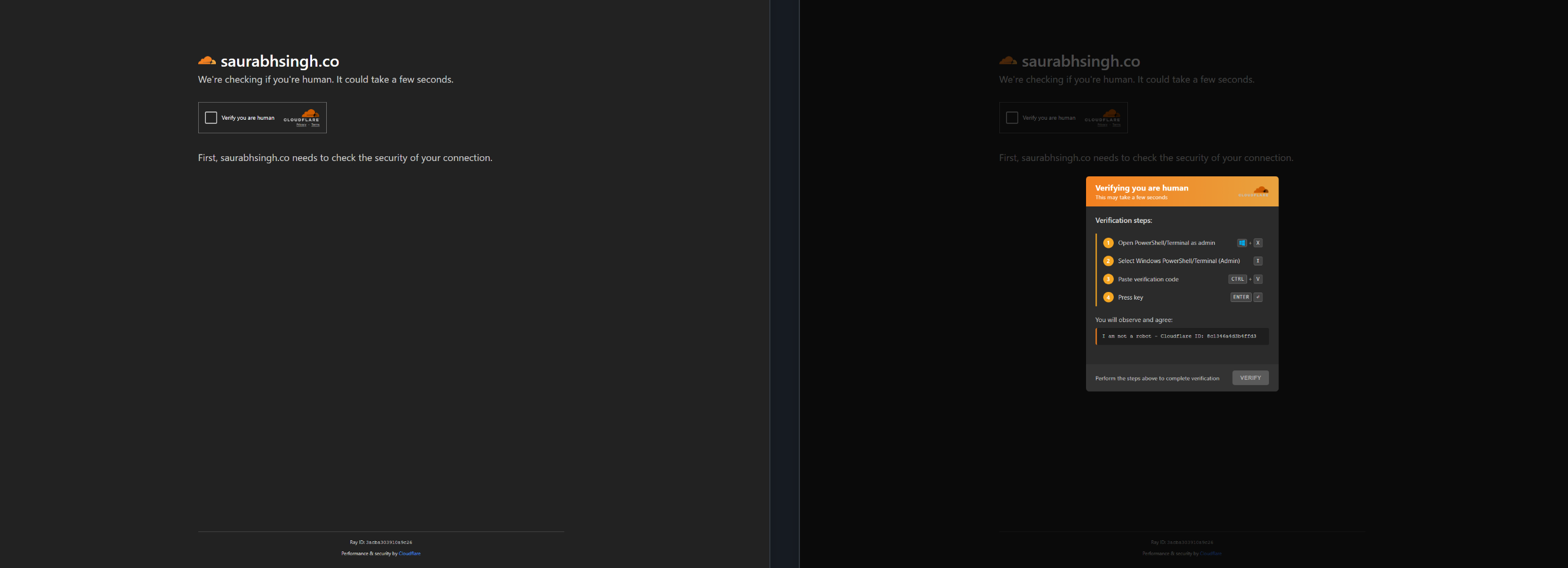
💡 Click image to enlarge
Oops, What Happened?
I would say you executed a malicious command…. Malware on your device? Probably.
⚠️ Critical Risk
Users unknowingly execute malicious PowerShell commands through a seemingly harmless captcha verification.
Why is ClickFix So Clever?
ClickFix is brilliant! It is very easy to implement. There is no real defense mechanism and people are kind-hearted. A website that was normal 2 days ago could be affected now. And you are asking yourself: I was on that page a few days back, nothing to worry about right?
Easy Implementation
Minimal technical skill required for attackers
No Defense Mechanisms
Standard browser security doesn't protect against social engineering
Human Trust Exploitation
Leverages natural user behavior and compliance
So What Can We Do About It?
Of course I could start talking about restricting devices, e.g. disable clipboard access, restrict PowerShell, web filtering and more and more. But is that the best option? It can help, yes, but the biggest point here is user awareness.
Everyone in the company or in their personal life needs to know about this. One example, some text and an explanation of why this could be bad.
🛡️ Defense Measures
- •Never run commands blindly - Copy-pasting from websites is dangerous
- •User awareness training - Educate employees and family members
- •Disable clipboard access - Where possible, restrict clipboard operations
- •PowerShell restrictions - Implement execution policies
- •Web filtering - Block known malicious domains
No legitimate website will ever ask you to run a PowerShell command. Never! It is not new to anyone that the human is the biggest weakness. But ClickFix is showcasing it even more.
ClickFix Hunter
ClickFix Hunter is a project developed by carsonwestwilliams that catalogs domains known to host or have previously hosted ClickFix malware. The tool provides a searchable database of compromised domains and includes examples of the command lines used in these attacks.
One of the project's most valuable features is the ability to observe the variety of attack methods and page designs employed across different campaigns. The comprehensive domain list also serves as a useful reference for establishing DNS-based blocking rules. Though this approach should be implemented cautiously, as it requires careful verification to avoid blocking legitimate sites.
Visit ClickFix Hunter →🎯 The Bottom Line
ClickFix demonstrates that the human element remains the strongest attack surface. User awareness and education are your best defense mechanisms.